DayOf Photo is two apps that work as one. The web app runs everything parents and staff touch: rosters, your own order site, payments and reminders. The Windows desktop studio runs the photos: it sorts them by file number, cuts out every student with AI, drops them into your borders and prints every order on the right printer.
These are the real screens. Import a whole school from one spreadsheet, number every student on picture day, then let the desktop studio sort the card and print every order.


While one student is on the backdrop, the helper at the table asks the next one's name, finds them in DayOf Photo and queues them up. The file number is already filled in, so one press of Enter links each photo to the right kid.
Everything before and around the camera. Student and team rosters, passcode slips, online ordering, payments, texting and reports, all on your own branded link. League scheduling is there when you need it.
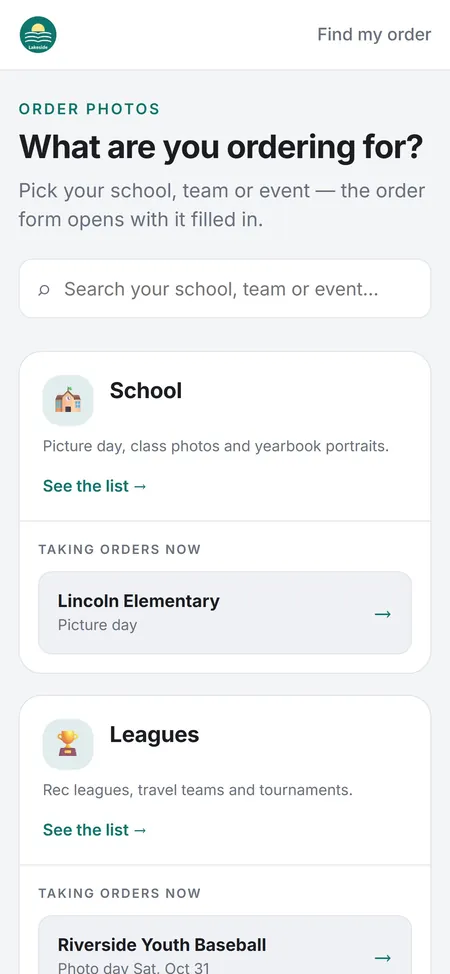
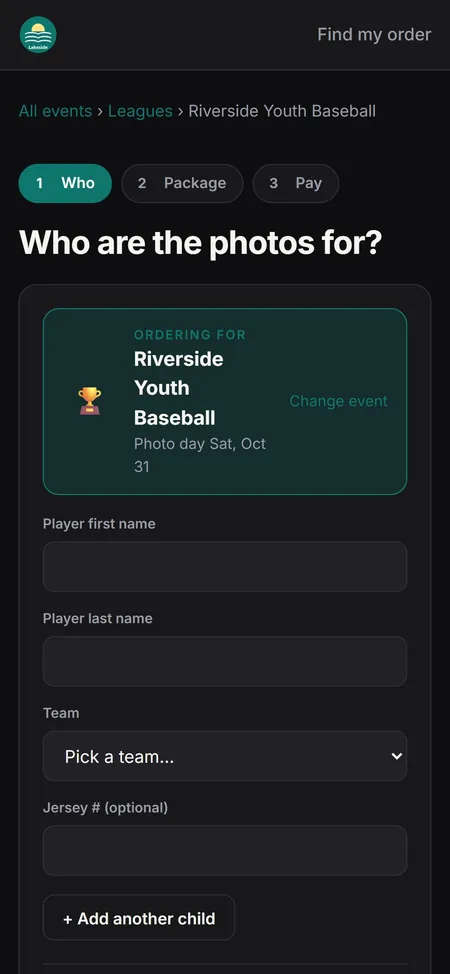
Your order site wears your logo and your color, and follows each parent's phone into light or dark mode. Every active event is a direct link: tap one and the form is already filled in. Pick the student or player, choose a package, pay. Add a sibling without re-entering anything.
Light on one phone, dark on the other · real screens, sample studio


Filter by paid, pending, pay later or Venmo, search by name or file number, and open any order to edit, refund or reprint. Revenue and what's still owed sit right on top.


One big search box and big buttons. Tap Mark paid for cash, type a check number for checks, and Venmo payments that didn't match themselves sit next to the order they probably belong to.


Pick an event and see what's left: league orders waiting for a number, or a whole school roster. Type the number, press Enter, and the next one comes up.


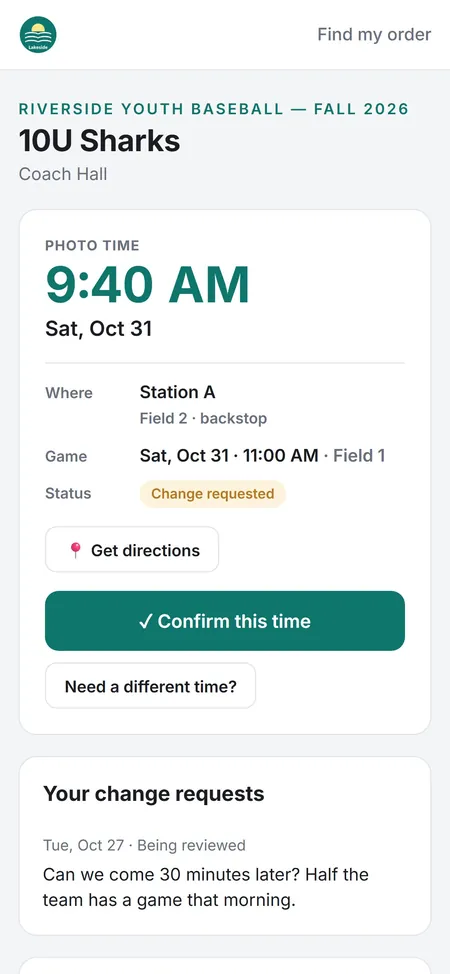
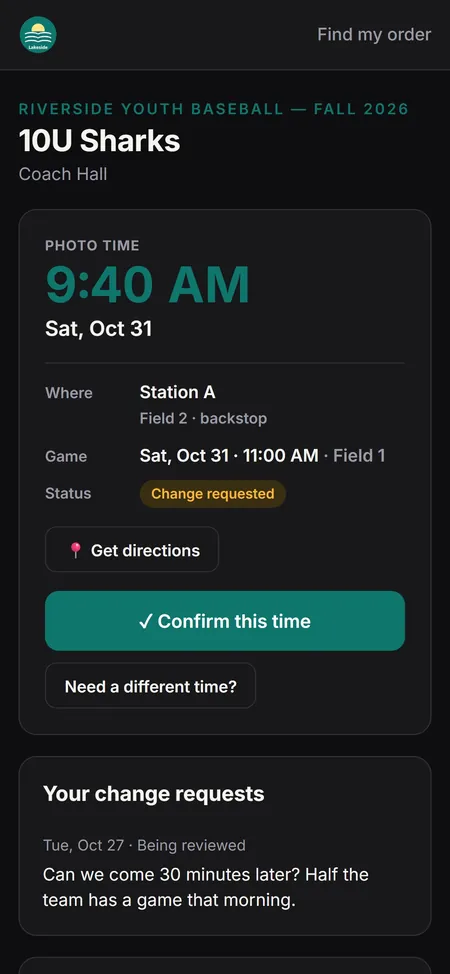
Every coach gets a private link with their photo time, the field and a big Confirm button. A change request lands on your board in the coach's own words, and one click moves the team and texts them back.


Replies come into one inbox with the whole thread, your automatic texts included. The order is right there, and anything that needs doing becomes a to-do in one click.


Scan the order labels, paste a list or add a whole team. Write one message with the pickup place and time, and each family gets it by text or email with their own child's name in it. Right after a print run, the Print Board offers to notify those exact orders.


Pick a brand color and upload your logo. Your order site wears them in light and dark mode. Prices, packages, payments, tax and your team all live in plain Settings categories.
Parents can reserve an order on the form and pay later. You choose how often DayOf Photo reminds them, what time of day, and how many times. Each reminder is a text, or an email if they didn't opt in to texts, with a secure link to pay. When they pay, the order flips to paid on its own.
Everything after the shutter. AI cutouts on any backdrop, borders and composites, package building and print routing, synced to the same orders the web app took.


The parent order form follows each phone's setting on its own. The staff site switches with one tap, and the desktop studio can match Windows. Same app, easy on the eyes at a 7 AM picture day or a late print night.


Set up in the gym, the library or the hallway. AI lifts each student off whatever was behind them, drops them into the school's border, and batches the whole grade while you pack up.

DayOf Photo reads the order, builds the package, and sends each sheet to the right printer. Two Fuji DX-100s, or whatever you run, with zero re-queuing.
A parent pays for blemish removal or teeth whitening. The desktop studio lists every photo that needs work, and DayOf Retouch opens them one after another with the parent's picks beside the photo. Press Save & next and the composites redo themselves.

Brush smoothing on where it's needed. Strength and Keep texture keep it natural, and it lives on its own layer you can hide or redo.

Jump straight to the face, brush over the teeth, and set the strength. A mask keeps lips and skin exactly as they were.

Hold Before / after to see the original, and step back through every change in History. Save writes the photo back in place.

Select Subject outlines the person in a click, and Object Finder grabs anything you draw a box around. It runs on your own computer.
The league sends a spreadsheet. You send back a schedule, every coach gets a text, every parent gets an order link, and photo day runs itself. Memory mates and team composites print the same night.
AI cutouts, themed borders and on-site print routing turn any venue wall into a finished 5×7, printed on site. Digitals go out behind a passcode gate with your branding.
Events are sent to the desktop automatically. File number changes made on the desktop update the web app on their own, and every order syncs automatically.
| Part of the day | DayOf Photo | The usual way |
|---|---|---|
| Rosters | Import the school's CSV once. File numbers, passcode slips and yearbook names all come from it. | Retyping names from a PDF the office sent |
| Backdrop | Any. White seamless, gray or the gym wall, and AI cuts them all out | Green screen, stands, two lights, spill and a 40-minute setup |
| Ordering | Branded order link per student, pre-paid before picture day | Paper envelopes and cash in a backpack |
| Payments | Card and PayPal payments mark themselves paid. Cash, checks and Venmo clear in one tap at the table. | Matching Venmo screenshots to envelopes at midnight |
| Yearbook and IDs | Simplified yearbook exports with just three clicks | Renaming files by hand from a printed roster |
| Editing | AI cutouts, touch-ups in the included DayOf Retouch editor, batch composites | Legacy booth software plus Photoshop actions |
| League scheduling | Auto-placed board, drag to adjust, coaches confirm by text | Spreadsheet, group texts, three phone calls per coach |
| Printing | Packages built from the order, routed by size automatically | Manual queues, wrong printer, reprints |
| Proofs and digitals | QR passcode slips, watermarked previews, digital copy texted or emailed when it prints | Emailing ZIP files one family at a time |
| Payment table | Cashier view: one tap for cash, check numbers logged, drawer totals | A cash box, a clipboard and a calculator |
| Parent questions | One inbox with the order beside every thread | Texts scattered across three phones |
| Tools to pay for | 1 | 5 to 7 |
Your studio's name and contact, your logo and brand color, what you shoot, starting prices, sales tax, how parents pay, and your team. Change any of it later in Settings. Storage and texting are set up for you.


Every studio gets the whole product: the order site, the staff site and the desktop studio. No tiers, no setup fee, month to month.
Free for your first 30 days, then $200 a month. Month to month; cancel any time and take your data with you.
Start your 30-day free trial →The trial includes everything, with the same included amounts. Texting starts once you add a card, because carrier registration has a one-time fee; until then, updates go out by email. Texting fees show up on your monthly invoice as one "Texting (at cost)" line. The included amounts are fair use: if your studio is well past them, we'll reach out to talk it through, and we never charge extra without asking.
DayOf Photo doesn't take a cut of your sales. These are the fees charged by the payment and texting companies, or things you buy yourself.
2.9% + 30¢ per online card sale. +1.5% for cards from outside the US, +1% if currency is converted. $15 per disputed charge. Optional instant payouts: 1.5% (50¢ minimum).
A $45 Gold package: about $1.61 fee, you keep $43.39.
3.49% + 49¢ per PayPal or Pay-with-Venmo checkout. $20 per chargeback.
A $45 order: about $2.06 fee.
A Venmo business profile charges about 1.9% + 10¢ per payment received (check Venmo's current rate). Mark them paid in one tap at the cashier table.
A $45 order: about $0.96 fee.
No fees. Record them at the payment table with the cashier view.
2,000 texts in a month: about $22–$27, plus the number and campaign fee. Until registration is approved (usually 1–3 weeks), updates go out by email.
A Windows PC for the desktop studio. Your printers, paper and ink. Your own domain name if you want one (about $10–$20 a year). Sales tax is set per school or league in DayOf Photo and added to each order; you file and pay it to your state.
Payment and texting fees are set by Stripe, PayPal, Venmo and Twilio and checked Oct 16, 2026. They can change.
Yes. Bring your white seamless or gray, or shoot against the wall you're given: the gym, the library, a hallway. No green screen needed. The cutout runs on every photo and drops each student into your border. Even light and a few feet between the subject and the backdrop give the cleanest edges.
Try everything free for 30 days, no card needed. After that it is one plan: $200 a month, month to month, with every feature. It includes 500 GB of photo storage, 5,000 emails a month and 3 desktop computers, on a fair-use basis: we never charge extra without talking to you first. Card, PayPal and Venmo fees go to those companies, and texting is passed through at Twilio's cost. The pricing section lists every one.
No. They tap the link for their event (or scan the QR slip), find their student or player, and pay. School proofs are protected by the passcode on the slip.
Card, PayPal or Venmo online, or cash and check at your table using the cashier view. Card and PayPal payments mark the order paid on their own; Venmo, cash and checks are cleared in one tap at the cashier table.
No. DayOf Retouch comes with every plan and installs from the desktop studio in one click. It opens each photo a parent paid to have touched up, shows the touch-ups they picked, and saves the photo back so the composites redo themselves. Skin smoothing, teeth whitening, spot healing and AI selection are built in. Prefer Photoshop? Switch it in Settings and every button opens Photoshop instead.
No. Texting and photo storage are part of DayOf Photo. In Settings → Messaging you ask for a local texting number and we file the carrier registration for you; until it's approved, order updates and digital copies go out by email.
Yes. Leagues get the scheduler, coach confirm links, team and individual file numbers, memory mates and team composites. Schools get rosters by grade and teacher, passcode slips, retake picking and yearbook exports. Many studios run both.
Yes. Each person signs in to the staff site with their own login. You choose what each person can see and do, owner-only settings stay hidden, every change shows in the change log, and new computers can be set to wait for your approval.
Yes. Every new studio starts in Sandbox mode. Import a roster, place test orders, take test card payments, enter file numbers and print test packages; nothing is charged and no texts or emails go out. Switch to live when you are ready.
Not yet. The desktop studio is Windows for now, and a Mac version is planned. The order site and the staff site work in any browser, on Mac, Windows, tablets and phones.
Printers installed on your Windows print PC. DayOf Photo sends each size to the printer you choose for it (for example a 5-inch and an 8-inch dye-sub) and prints a divider sheet after each team.
Yes. Import school rosters from the CSV the school sends (photos, school sports, sports groups or staff) and league teams from a spreadsheet. Columns can be in any order.
Email hello at dayofphoto dot com with any question, before or after you sign up.